Is Planner 5D free?

Yes — and it stays free, with no trial clock. You can create unlimited projects, use roughly half the furniture catalogue, and work on the web or on your phone without paying anything.

What you cannot do for free is get anything out of it. Renders, floor-plan upload, 3D model import, 360° walkthroughs and CAD export all sit behind a subscription. If your plan is to design a room and then show it to someone, that last step is the paid part.

Checked 19 August 2026 against planner5d.com/pricing

What the free plan actually includes

Checked 19 August 2026 on planner5d.com/pricing
Number of projects
Free UnlimitedPaid Unlimited
Furniture catalogue
Free About half of itPaid 10,000+ items
Design on web and mobile
Free YesPaid Yes
Upload a floor plan and convert it
Free NoPaid Yes
Photoreal renders, standard and 4K
Free NoPaid Yes
Import 3D models from photos
Free NoPaid Yes
360° walkthrough
Free NoPaid Yes
Budget tracking
Free NoPaid Yes
AI Studio credits
Free NoPaid Yes
CAD export
Free NoPaid Professional only
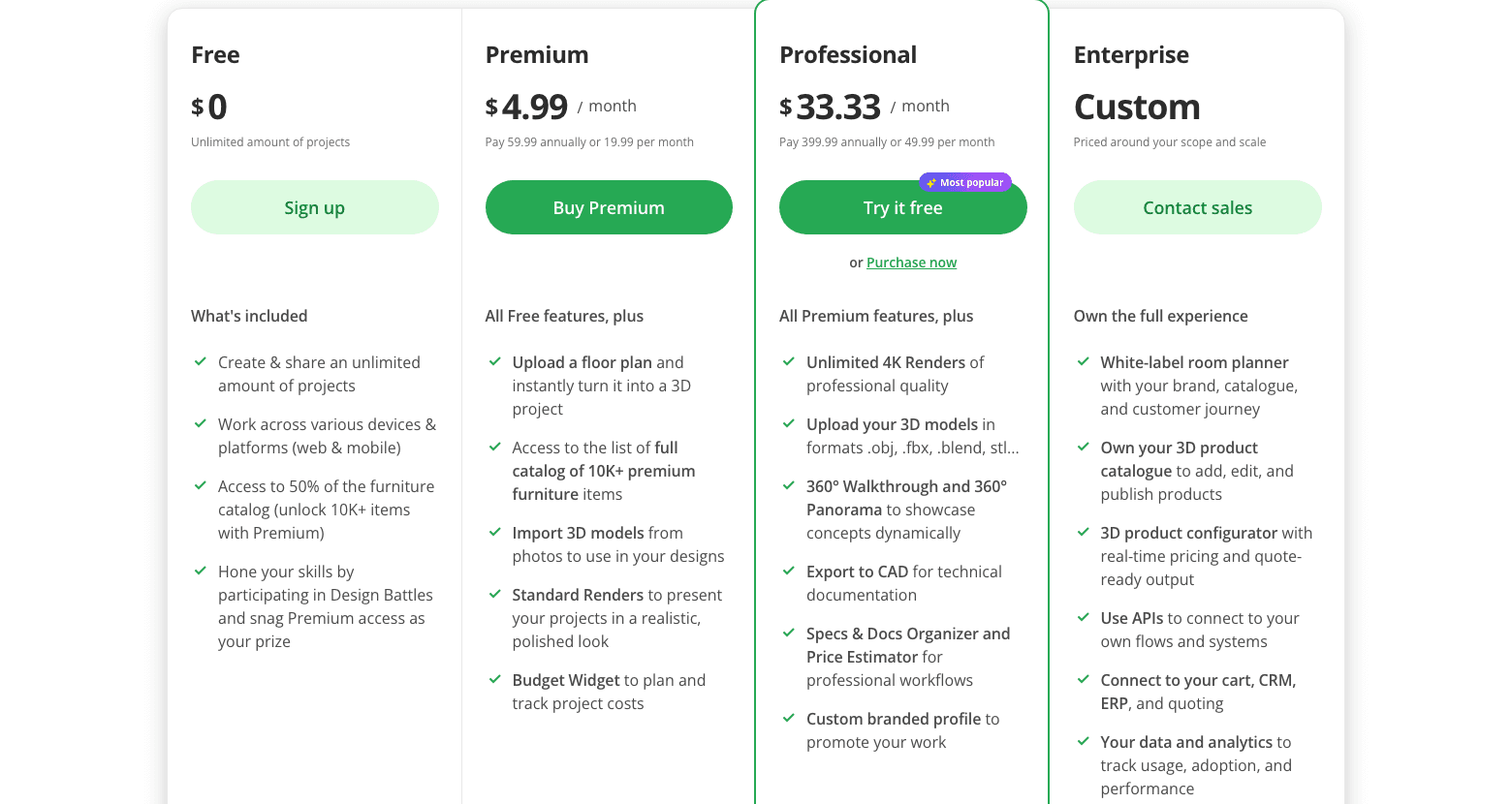
Planner 5D pricing page showing the Free, Premium, Professional and Enterprise tiers side by side
Their own tier comparison. Note which number is set large on Premium: the annual rate divided by twelve, with the actual monthly rate in small text beneath it.Planner 5D · captured August 2026

The part the pricing page does not mention

On the mobile apps there is a second layer of friction the website says nothing about. Users describe ads pushing the upgrade at nearly every step, and furniture unlocked by watching an advert re-locking again after a few days.

This is not historical. Both quotes below were left this year.

ads for paid at every turn, from getting started to just adding a door to a first sketch
Google Play · 2★ · January 2026
all the AI ads after almost every button I press
App Store · 3★ · May 2026

On the web version, no ad complaints appear at all — zero across the GetApp and SoftwareAdvice reviews, against 128 of 730 on the two app stores. If ads are your concern, the browser is the version to use.

Platform gaps worth knowing before you pay

Several users paid first and discovered the limit afterwards — one specific to their device.

paid for 1 month subscription on my Android tablet only to find you can't upload house plans on Android
Google Play · 2★ · September 2021
The app simply does not work on iPhone
App Store · 1★ · July 2026

Check the feature you need works on the device you own — on the free tier, before subscribing.

What it costs if you do pay

Prices checked 19 August 2026 on planner5d.com/pricing
Free
$0
Laying out a room for yourself$0/mo
Premium
$59.99
Renders, floor-plan upload, budget tracking$19.99/mo
Professional
$399.99
4K renders, CAD export, client-facing work$49.99/mo
Enterprise
Custom
Teams, on request/mo

Yearly billing is the real price

Premium at $59.99 a year works out to $5 a month against $19.99 monthly — a 75% difference. Almost nobody needs a floor planner twelve months running, which is what makes the monthly plan the expensive trap: two months billed monthly costs more than eight months billed yearly.

Watch the auto-renewal

The loudest complaint in the reviews is not the price — it is being charged after intending to cancel. If you subscribe for one project, set a calendar reminder the day you buy.

There is no warning that your auto renew is about to be charged, then when I tried to cancel it the next day, they said it was not possible to get a full refund
Capterra · 1★ · April 2025

What people who used it say

From 736 reviews across GetApp, SoftwareAdvice, the App Store and Google Play.
What people like
The platform is very intuitive and easy to use, even for someone without a design background. I especially liked how quickly I could create a full home layout and visualize it in 3D
Capterra · 5★ · April 2026
it made it very convenient to get a visual of the design before construction began
Capterra · 5★ · June 2025
What wears thin
It's so limited in its free state, and cost almost as much as Netflix for a monthly plan
Google Play · 2★ · November 2019
There are 1 or 2 free items each category and if you want to do simple stuff like resizing or changing colour it is either not available for free members or you need to watch a billion ads
Google Play · 2★ · December 2020
i just hate being locked out for having no money for premium. allow us to have ads instead to access good features. 3d models also load really slow
Google Play · 3★ · February 2026

The pattern across all of them: the tool itself is well liked. The friction is about where the free tier stops and how hard the product pushes you across that line.

Who the free tier is enough for

Free is enough if

  • you are laying out one room or one flat for yourself
  • you want to see it in 3D on screen rather than export anything
  • you can start from a blank plan and draw the walls yourself
  • you are on the web version, where the ad friction does not appear

You will hit the paywall if

  • you have a floor plan as a photo or PDF and want it converted
  • you need an image to send to a partner, a landlord or a builder
  • you want a 360° walkthrough or a CAD file
  • you are tracking what the room will cost

What else to look at

Sweet Home 3D
Fully free, open sourceDesktop, dated interface, no paywall anywhere. The most genuinely free option here
Floorplanner
Free tier, paid exportsClosest in feel to Planner 5D
Homestyler
Free tierLarge catalogue, browser-based
HomeByMe
Free projects, then paidGenerous on renders within the free allowance
SketchUp Free
Free web versionMore capable, steeper to learn, no furniture catalogue
IKEA planners
FreeOnly IKEA products, but complete and ends in a cart

If the honest answer to "free floor planner" is Sweet Home 3D, it is Sweet Home 3D. It has no paid tier to push you toward — which is exactly the complaint people have about Planner 5D.

Planner 5D and Decato answer different questions, and for the question on this page — how do I lay out a room without paying — Planner 5D or Sweet Home 3D is the better answer.

Decato is for the step after: when the furniture in the plan has to be real products you can actually order, with prices attached. You bring a floor plan you already have, and it matches in-stock furniture to the room and returns a priced list.

  • Planning is free; sourcing is not. The free download plans without limit on your own ChatGPT, Claude or Gemini key. Product matching and renders start at $20 a month. (Checked August 2026.)
  • It is a Mac app today. A Windows version is planned; if you are on Windows or Android right now, this is not your tool yet.
  • It does not replace a free floor planner. If you only need the layout, you do not need us.

Common questions

Is Planner 5D free forever, or is it a trial?

Free forever. There is no countdown — you can keep unlimited projects on the free plan indefinitely. The limits are on features, not on time.

Does the free version put a watermark on your designs?

No watermark complaints appear anywhere in 736 reviews, and the pricing page does not mention one. The constraint is that renders are not available on the free tier at all, so there is nothing to watermark.

Can I use Planner 5D free on my phone?

Yes, on both iOS and Android. Be aware that the ad friction described above is specific to the mobile apps — the browser version draws no such complaints.

What happens to my projects if I cancel?

Projects remain in your account; the paid features stop. The thing to watch is the auto-renewal rather than the projects — refund complaints after an unintended renewal are the most common one-star review on the product.

Is the yearly plan worth it?

If you need one render or one floor-plan conversion, a year up front costs less than three months billed monthly — see the table above. If you need neither, the free tier already does what you are asking of it.